Guru Charts3.07
Publisher Description
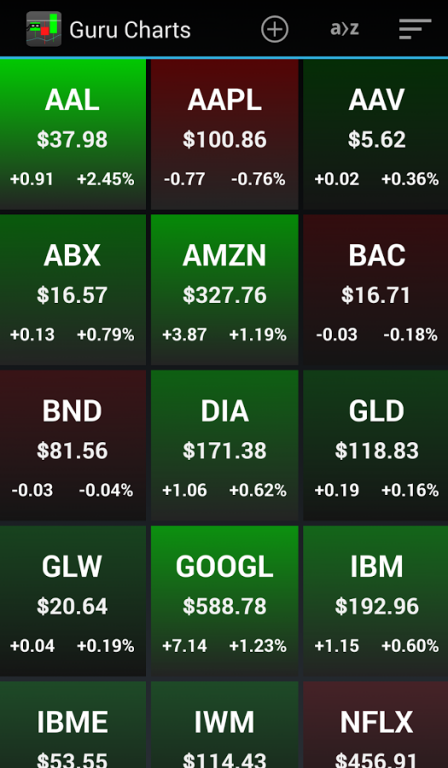
Slick stock charting app that lets you easily customize your overlays and indicators.
Easy-zoom functionality lets you zoom in and out with the swipe of one finger.
Colorful heat map displays the performance of your stock list throughout the day.
Choose tickers from stock exchanges throughout the world.
Available exchanges:
NYSE - USA
NASDAQ - USA
AMEX - USA
Toronto Stock Exchange - Canada
TSX Venture Exchange - Canada
BOVESPA - Sao Paolo Stock Exchange - Brazil
Vienna Stock Exchange - Austria
Copenhagen Stock Exchange - Denmark
Paris Stock Exchange - France
Dusseldorf Stock Exchange - Germany
Hamburg Stock Exchange - Germany
Hanover Stock Exchange - Germany
Munich Stock Exchange - Germany
Stuttgart Stock Exchange - Germany
XETRA Stock Exchange - Germany
Milan Stock Exchange - Italy
Amsterdam Stock Exchange - Netherlands
Oslo Stock Exchange - Norway
Madrid SE C.A.T.S. - Spain
Stockholm Stock Exchange - Sweden
Swiss Exchange - Switzerland
London Stock Exchange - United Kingdom
Shanghai Stock Exchange - China
Shenzhen Stock Exchange - China
Hong Kong Stock Exchange - Hong Kong
Jakarta Stock Exchange - Indonesia
Tel Aviv Stock Exchange - Israel
Singapore Stock Exchange - Singapore
Korea Stock Exchange - South Korea
KOSDAQ - South Korea
Taiwan Stock Exchange - Taiwan
Australian Stock Exchange - Australia
New Zealand Stock Exchange - New Zealand
Also supports USA ETFs and Mutual Funds
Disclaimer: This app is for educational purposes. It is not intended to provide information on which the user would base trading decisions
About Guru Charts
The company that develops Guru Charts is A to Z Apps. The latest version released by its developer is 3.07.
To install Guru Charts on your Android device, just click the green Continue To App button above to start the installation process. The app is listed on our website since 2016-07-23 and was downloaded 34 times. We have already checked if the download link is safe, however for your own protection we recommend that you scan the downloaded app with your antivirus. Your antivirus may detect the Guru Charts as malware as malware if the download link to net.atozapps.www.gurucharts is broken.
How to install Guru Charts on your Android device:
- Click on the Continue To App button on our website. This will redirect you to Google Play.
- Once the Guru Charts is shown in the Google Play listing of your Android device, you can start its download and installation. Tap on the Install button located below the search bar and to the right of the app icon.
- A pop-up window with the permissions required by Guru Charts will be shown. Click on Accept to continue the process.
- Guru Charts will be downloaded onto your device, displaying a progress. Once the download completes, the installation will start and you'll get a notification after the installation is finished.
Program Details
System requirements
Download information
Pricing
Version History
version 3.07
posted on 2016-07-23
-Fixed bugs,-Improved awesomeness
